WebRTC (Web Real-Time Communication) is an open-source project that enables real-time communication between browsers and devices using peer-to-peer connections. It allows audio, video, and data sharing without requiring additional plugins or external software.
How Does WebRTC Work?
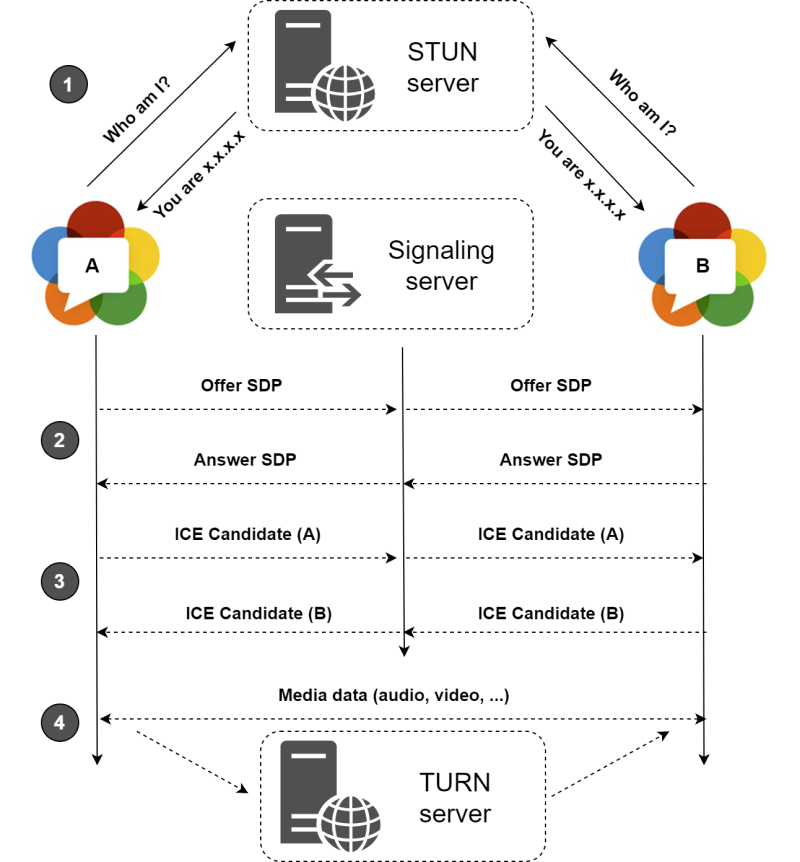
WebRTC works by establishing a direct connection between two peers (browsers or applications) to transmit media (audio/video) and data. The connection process involves several steps:
- Media Capture – A user’s camera and microphone are accessed.
- Signaling – Exchanging connection details between peers via a signaling server (e.g., using WebSockets).
- ICE Candidate Discovery – Finding the best network path between peers.
- Connection Establishment – Securely connecting the peers.
- Data Transmission – Streaming audio/video or sending arbitrary data.
2. Main Components of WebRTC
WebRTC consists of three primary components:
a) MediaStream (getUserMedia) – Capturing Audio/Video
- The
MediaStreamAPI allows access to the user’s camera and microphone. getUserMedia()prompts the user for permission and returns a media stream.
Example Code:
navigator.mediaDevices.getUserMedia({ video: true, audio: true })
  .then(stream => {
    document.getElementById("videoElement").srcObject = stream;
  })
  .catch(error => {
    console.error("Error accessing media devices.", error);
  });
b) RTCPeerConnection – Handling Peer-to-Peer Connections
- This API establishes and maintains a direct peer-to-peer connection.
- It manages network traversal, encoding/decoding, and bandwidth control.
Example Code:
const peerConnection = new RTCPeerConnection();
peerConnection.addStream(localStream);
peerConnection.ontrack = event => {
    remoteVideo.srcObject = event.streams[0];
};
c) RTCDataChannel – Sending Arbitrary Data
- Allows direct data exchange between peers (e.g., text messages, files).
- Uses a reliable and low-latency protocol similar to WebSockets.
Example Code:
const dataChannel = peerConnection.createDataChannel("chat");
dataChannel.onopen = () => console.log("Data channel is open");
dataChannel.onmessage = event => console.log("Received:", event.data);
3. WebRTC Protocols
WebRTC relies on multiple protocols to enable secure and efficient communication:
a) ICE (Interactive Connectivity Establishment)
- A framework for discovering and establishing peer-to-peer network paths.
- Works by gathering multiple candidate network addresses and selecting the best one.
b) STUN (Session Traversal Utilities for NAT)
- Helps devices behind NAT (Network Address Translation) discover their public IP.
- Enables direct communication between peers without using a relay server.
c) TURN (Traversal Using Relays around NAT)
- If direct communication fails (due to strict NAT or firewalls), TURN relays media through a server.
- More resource-intensive compared to STUN.
d) DTLS (Datagram Transport Layer Security)
- Encrypts all WebRTC communication for security.
- Provides authentication and prevents tampering.
e) SRTP (Secure Real-time Transport Protocol)
- Encrypts and ensures the integrity of media streams (audio/video).
- Works alongside DTLS to provide end-to-end encryption.
Summary
| Component | Purpose |
|---|---|
| MediaStream (getUserMedia) | Captures media (audio/video) from the user. |
| RTCPeerConnection | Manages peer-to-peer connections. |
| RTCDataChannel | Sends arbitrary data between peers. |
| ICE | Finds the best connection path. |
| STUN | Discovers public IP addresses behind NAT. |
| TURN | Relays media if direct connection fails. |
| DTLS | Secures data transmission. |
| SRTP | Encrypts media streams. |